
Set it.
Forget it.
Two automatic editors, right inside Premiere Pro. Single Cam trims every clip down to its best middle part and closes the gaps. Multicam switches between your camera angles on a clock. Press GO and the edit is done, in a copy of your sequence. No microphones, no audio analysis, no extra apps. Need cuts that follow the speaker? That’s Video Follows Audio.
Keep the good part.
Lose the rest.
Most clips start with setup and end with wind-down. Edimatic keeps the middle of every clip on V1, trims the same amount from the head and tail, and packs the clips back to back. Pick how much to keep: 90% for a light tidy, 25% for a fast highlight. An hour of raw clips becomes ten minutes, or two.
Your clips on V1.
Put your clips on V1 in order. Camera audio linked to each clip is trimmed with it; music and titles on other tracks stay where they are.
Keep 5% to 100%.
Set how much to keep, from 5% to 100%, and a minimum clip length so short shots stay whole. The preview shows the running time before and after.
Trimmed, gaps closed.
Edimatic trims a copy of your sequence clip by clip and closes the gaps. Your original is untouched.
Edit faster
than live.
Give every angle its own duration and Edimatic switches on schedule, cutting the tracks and enabling one camera at a time. It never listens to the audio, so it works on footage with no usable mics at all. Hours of tedious multicam switching, finished in minutes.
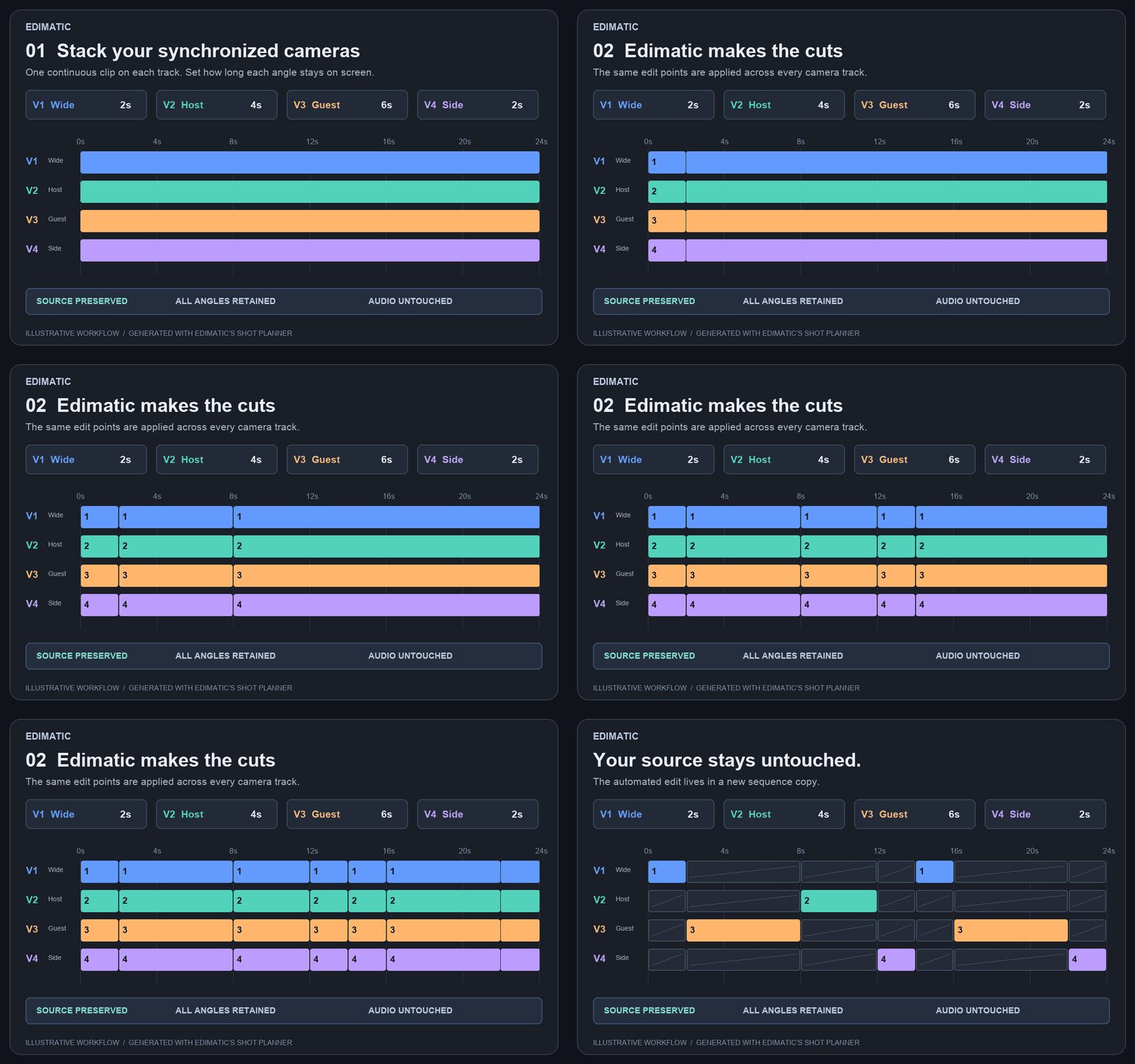
Automated cutting using Edimatic’s shot planner. Every alternate angle stays on the timeline, disabled, not deleted.
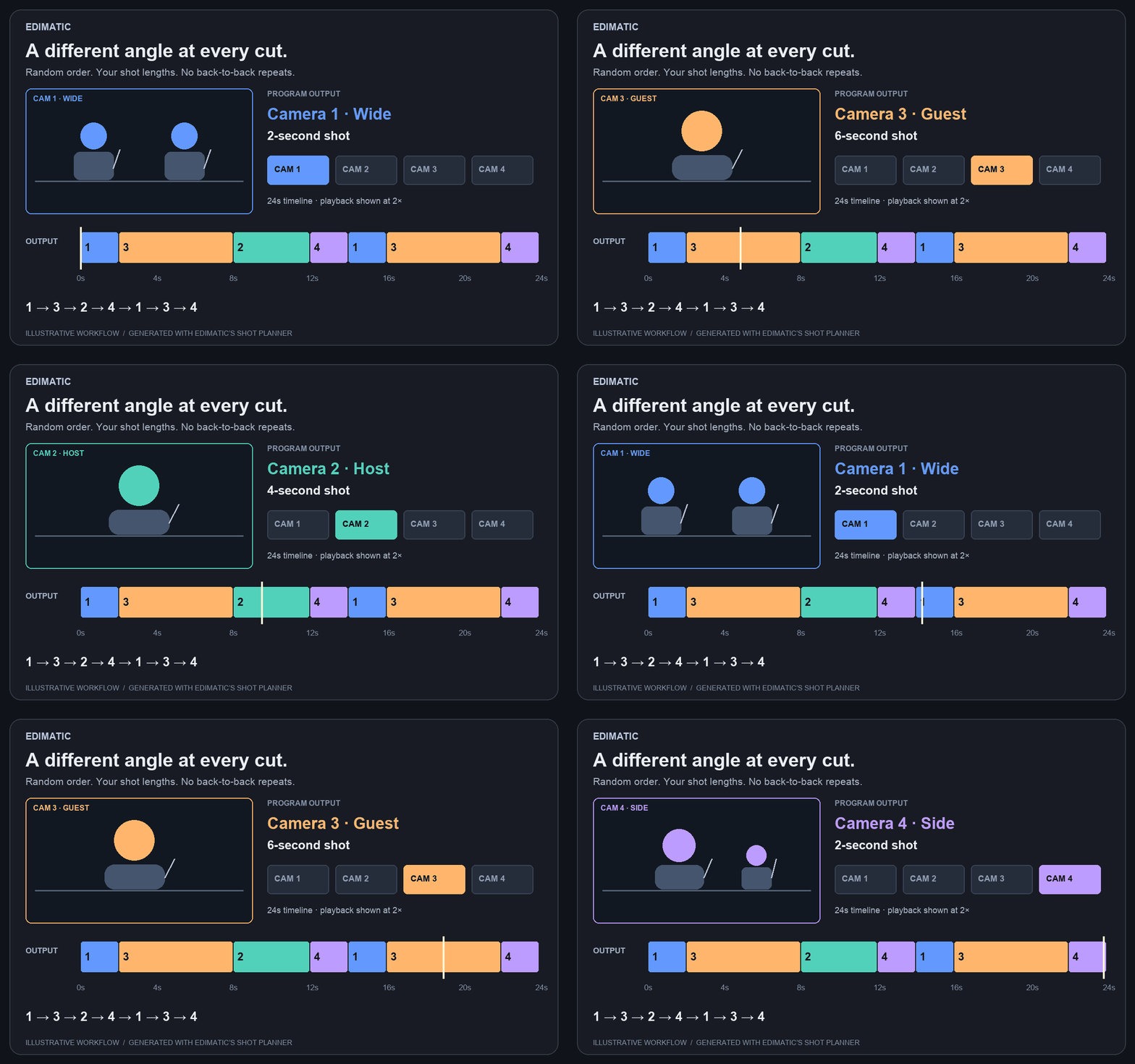
Go sequentially through your cameras, or shuffle the order. Random mode never picks the same angle twice in a row. Longer durations give an angle more screen time; favoring an angle makes it appear more often.
One angle. One track.
Put each camera angle on its own video track, synchronized. Cameras can start, stop and leave gaps; each angle is only used where it has footage. Keep titles and overlays above the camera stack.
Add a little variation.
Set 4 seconds with ±1 second of variance for shots between 3 and 5 seconds. Favor your priority cameras and name tracks as you go. Factor existing cuts into the pacing.
Completely non-destructive.
Your edit is created in a sequence copy. Clips are enabled and disabled, never cut away. Leave audio untouched, or switch matching audio tracks with their cameras: V1 → A1, V2 → A2.
Ready for your
camera stack.
Mac + Adobe Premiere Pro 2023 or newer required (2023, 2024, 2025 or 2026). Tested in Premiere 26.3.2. Edimatic follows your timing rules only; it doesn’t listen to audio, analyze speakers or judge picture content. You receive a Mac CEP panel installer, setup guide and license key. Your footage stays on your computer.
What does Single Cam do?
It keeps the middle part of every clip on V1, trimming the same amount from the head and tail, then closes the gaps so the clips play back to back. You choose how much to keep, from 5% to 100%.
Does Single Cam change my original clips or sequence?
No. It trims a copy of your sequence. Your original sequence and media are untouched, and clip effects are kept.
Does Edimatic analyze who is speaking?
No. Edimatic is time-based: it switches cameras on the shot lengths and switching rules you set, which is what makes it fully automatic and predictable for live events, concerts and presentations. For conversations where the camera should follow the speaker, use Video Follows Audio, which cuts on changes in the isolated microphone tracks.
Is the edit destructive?
No. Edimatic creates a copy of your sequence and switches angles by enabling and disabling clips. Your original sequence is untouched and every alternate angle stays available, so you can change any cut afterward in Premiere Pro.
How does the automatic switching work?
Give each camera a shot duration, optionally add plus or minus variance so shots are not all identical, and favor priority angles so they appear more often. Choose sequential order or random switching; random mode never picks the same angle twice in a row. Press GO and Edimatic cuts the whole edit range.
What do I need to run it?
A Mac running Adobe Premiere Pro 2023 or newer (2023, 2024, 2025 or 2026); tested in Premiere 26.3.2. For Multicam, stack at least two synchronized camera tracks; cameras can start, stop and leave gaps. For Single Cam, put your clips on V1. No additional apps to install.
Does it handle audio?
Yes. Leave audio untouched, or switch matching audio tracks along with their cameras (V1 to A1, V2 to A2). Existing cuts on the timeline can be factored into the pacing.
How does the license work?
$49 USD once, no subscription. One person may activate two computers. Your download and unique license key are delivered by Payhip. Internet is required for activation and periodic checks, with up to seven days offline after a successful check. Your footage never leaves your computer.
How do I install it or get help?
Quit Premiere, run the installer from your download, reopen Premiere and choose Window → Extensions → Edimatic, then activate with the key from your receipt. Keep your Payhip receipt for download access. Contact Tographer if you need help.
Stop switching by hand.
Start editing.
$49 USD · one-time purchase